How I Run Design, Development and Ops with a Team of Agents
November 17, 2026 · ai, agents
I want to share how I manage development with agents, and show a few of the ways I use Cindy.
Agents in every step
I’m building a product with a desktop app and a backend. Research, design, development, testing, release and running it after launch: agents now work on every one of these steps. In 29 days the product repo alone merged 902 MRs. I can’t watch that much work one item at a time, so I gave myself a narrow job. I set the direction, read the evidence and make the calls, and everything else goes to the agents.
Four things make it possible to let go like this. Agents get whole tasks, while direction and trade-offs stay with me, and every delivery has to come with evidence, because I manage by results. Repetitive management becomes process, and chores go to agents that run on a schedule. Mistakes get written back into the rules, with a review that runs by itself every day. I do all of this in Cindy. The Claude Code and Codex sessions and their memory live in one place, and features like voice input, remote desktop and cross-machine testing work out of the box, so I don’t have to assemble them myself.
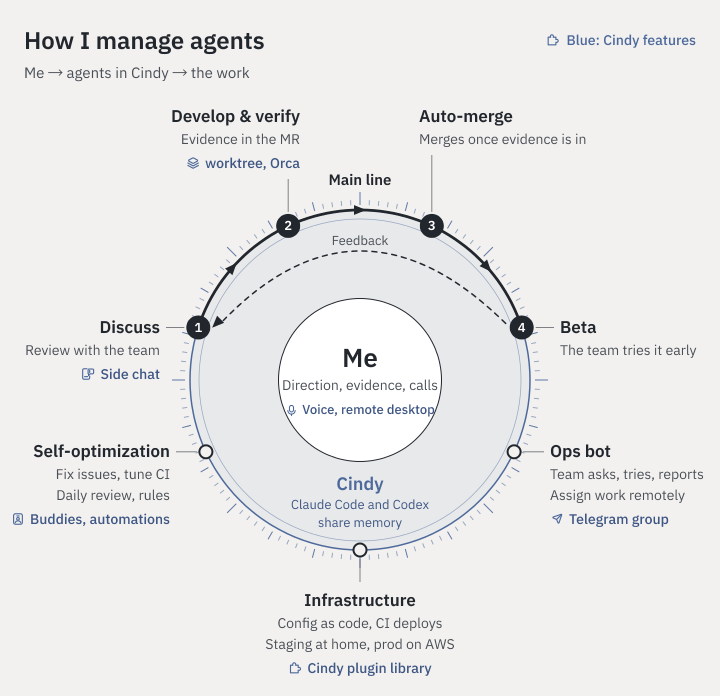
The whole post in one picture. I’m in the middle, Cindy’s agents surround me, and the work hangs on the ring. Blue text marks the Cindy features involved.
In the picture, my decisions go to the agents in Cindy, and they carry them out. The most important piece of work is the main development line. A requirement is settled with an agent first, the agent delivers with evidence, the change merges itself once the evidence is complete, and then the team tries it in a Beta, whose feedback starts the next round. Outside the main line, the infrastructure is also run by agents, and the ops bot works with the team in a Telegram group. Chores and the daily review go to buddies that run on a schedule, and the review writes lessons back into the rules, so the whole setup keeps running more smoothly. The sections below go through each part of the picture, and the Cindy features in blue come together at the end.
The main line
This is my AI-native development process, the four steps along the top of the picture: discuss the requirement, develop and verify, merge automatically, and try it in Beta. Feedback from the Beta goes into the next discussion. Writing code, opening MRs and running pipelines look much the same for everyone, so I’ll only cover the parts of each step where I put in real thought.
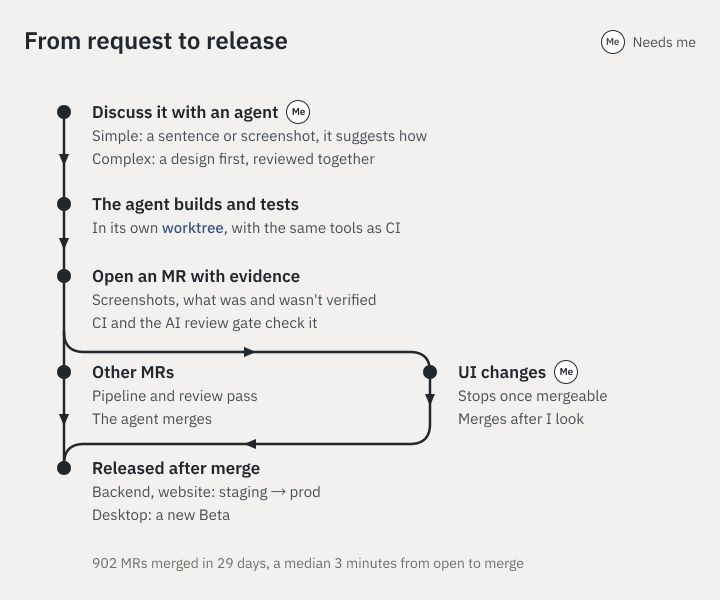
MRs that change the UI wait until I’ve looked at them. Everything else merges itself once the evidence is complete.
Discussing the requirement
Every requirement starts with a conversation with an agent. For something simple, a sentence or a screenshot is enough, and I let the agent suggest an approach. Big design and interaction changes are different. The team needs to agree on the plan before an agent starts.
For those, I have the agent turn the plan into a standalone HTML page and put it in a review tool. The team and I leave comments right on the page, by selecting text or drawing a box around an area, and reply to each other in the threads. The agent reads the feedback, revises the design, explains under each comment what it changed, and we look at the new version. The team and the agent stay in the same context the whole time, and nobody has to explain which part they meant.
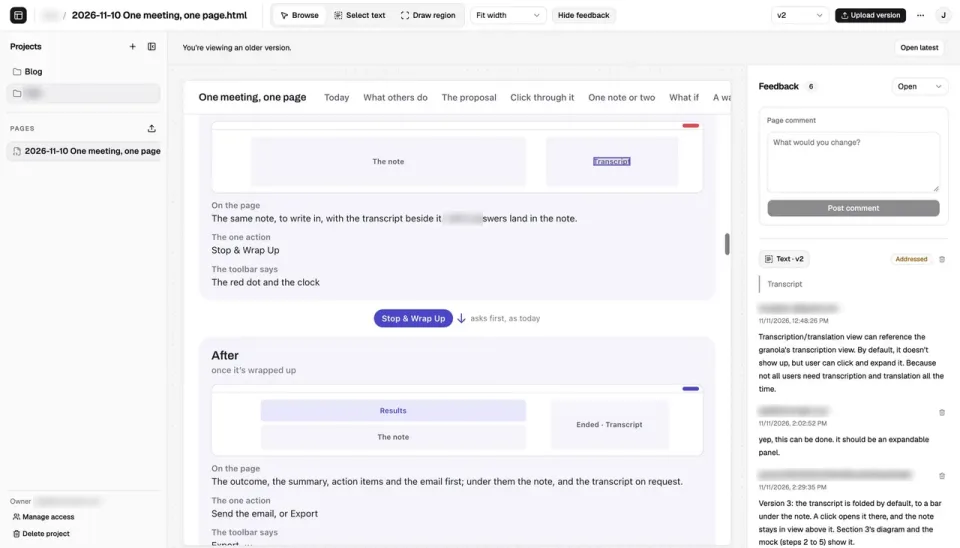
Comments, discussion and revisions all happen on the same page.
Side work
A big task always turns up problems that are related but separate. My rule is not to interrupt the main line. Anything that needs discussion goes into a side chat, and anything that isn’t urgent becomes an issue for later.
A side chat branches off the current session and takes its context along to look into or talk through something, while the main line keeps going. On one big feature I opened more than a dozen of them.
Non-urgent problems go into GitLab work items. Bugs the agents find while working, possible improvements and follow-up work are all filed as issues before a task wraps up, or added to existing ones. Every issue carries a status label. The ones that need my call are labeled “waiting on me”, and anything labeled “ready” is handed to an agent. Of the issues opened in the product repo during this period, 190 are already closed.
Development, verification and automatic merge
Once the requirement is settled, the agent writes the code and opens an MR. What I put the most thought into is how to tell whether it really got it right. Agents merge more than thirty MRs a day on average. I can’t read the code for each one, so I read evidence, and that leaves me three things to manage: how changes are verified, what evidence comes with them, and when they can merge.
Verification is the same everywhere. Agents and CI use the same command-line tools to run tests, take screenshots and wait for pipelines, so whatever gets checked locally gets checked the same way in CI. When something needs acceptance testing on Windows or another Mac, I don’t have to arrange it. The main session sends the tests over and the results come back on their own.
The evidence goes in the MR. It covers what changed, what was verified, what wasn’t, and whether any shortcut was taken. UI changes also need before-and-after screenshots of main and the branch. What wasn’t verified matters most. An alert rule that was replayed against real logs hasn’t necessarily fired in Telegram, and if that isn’t written down, all I see is passing tests.
When the evidence is complete, the pipeline passes and the review bot approves, the agent merges on its own. Only MRs that change the UI wait for me to take a look. Across those 902 MRs, the median time from open to merge was 3 minutes.
These rules live in AGENTS.md. Most were added after an agent made a mistake, and in about 30 days the file changed more than 300 times. Once, trying to reproduce a flaky test, an agent started 24 busy loops to load the CPU and pushed the load above 40 without reproducing anything. The rule now is to add an artificial delay only at the suspected step, and to show first that the old test fails and the new one passes. Another time, the prod check counted any 200 as success. The check was green while prod was actually serving an empty page, so now it only accepts a response that carries an API request ID. Once a rule is written down, every later session follows it.
Trying it in Beta
I want new features in the team’s hands as early as possible, without waiting for everything to be done. The way to get there is feature flags plus a few different builds.
Unfinished features can still merge. The unfinished parts sit behind a flag and land every day in small MRs. Flags are off by default and can only be turned on in the developer settings.
During development I use the debug build. By default it connects to a full set of services running on my machine, the local stack, with a test account, demo data and a fake AI, and every flag can be turned on. Switching environments takes four settings: local, staging or prod, test account or Google sign-in, demo data or real data, and a fake or real AI. So the same debug build can also connect to the staging environment at home. Agents test with the test account, and when I want to try it myself I sign in with my own Google account. After backend and website changes merge, CI deploys to staging first, runs the end-to-end checks, and then deploys to prod automatically.
Once something is ready to try, it goes to the team through Beta. Beta and the release build can be installed on the same computer, with separate data, sign-in, update channels and icons. Beta connects to prod and uses real accounts, but it can only turn on flags marked for Beta. Every MR that touches the app gets a new Beta from CI once it merges and its tests pass. The app checks for updates every hour, and the release notes are the titles of the MRs merged in between. On busy days that’s 30 Betas.
The release build is different, and I decide when it ships. It has no developer settings, so flags can’t reach it. When it’s time to release, an agent opens an MR that bumps the version and uses an existing skill to draft release notes from the changes since the last version. After the merge and the tag, CI builds, signs and notarizes it with Apple, and ships it to the staging update channel first, then to prod.
Infrastructure goes to the agents too
All of this runs on an environment behind it, the homelab at home, the development machines and CI, and prod on AWS. I hand these to agents as well, and the approach is the same as for the product. Configuration is written as code, and changes go through MRs. In 29 days the infrastructure repo merged 134 MRs.
Everything as code
Agents can only run infrastructure well if all of it is written as code. Everything at home lives in one infra repo managed with Ansible and OpenTofu, covering the home services, the self-hosted GitLab, a shared Postgres, DNS backups, and the Mac and Windows development and CI environments. The Mac mini that runs coding agents and CI was set up by an agent from playbooks it wrote. I wrote earlier about rebuilding my homelab with an agent, and day-to-day maintenance still works that way.
Infrastructure changes work like product changes. They need an MR and have to pass CI and the AI review gate. Bigger changes leave a work log, methods worth reusing go into the ops docs, and when the topology or services change, the homelab current-state note gets updated. That way a new session can pick up the work from the code and docs without me explaining the history again.
Local stack for speed, AWS for stability
The environments live in two places, each used for what it does well. Staging runs on machines I already have at home, which saves a fair amount of cloud cost. Prod runs on AWS, built for high availability, with automatic backups every night. Each side faces the internet through its own Cloudflare Tunnel and is deployed by CI, and the AWS and Cloudflare configuration is OpenTofu code as well. Moving prod to AWS was quick, too. Planning started on November 6, and the switch happened on the 7th.
Once prod was live, what mattered most was hearing about problems right away. Metrics and logs go into a monitoring dashboard, and errors raise alerts. An agent tuned the alert rules and checked them by replaying real logs, to cut down false alarms from short-lived errors. Every morning another job reads the app’s crash reports, investigates anything it finds, and then tells me.
I still merge every MR in the infra repo myself, though. Agents that run overnight can propose changes and open MRs, but they can’t touch running machines directly.
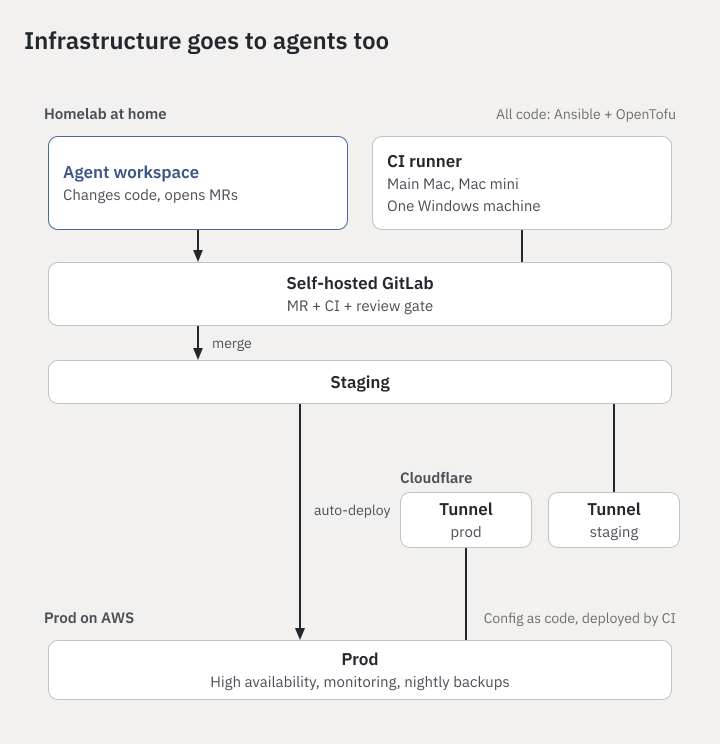
Staging at home, prod on AWS, configuration as code, deployed by CI.
How the product code is organized
On the product side, everything lives in one monorepo, so an agent can see the whole product at once. The Mac and Windows desktop apps, the backend, the website, the API definitions, deployment config, design mocks and tools are all in it, and the client API code is generated from the definitions.
When a feature needs changes to the app, the backend and the API at the same time, one MR can make and test all of them, with no version alignment across repos. The whole repo has one AGENTS.md, one command-line entry point and one CI, so the rules and verification described above apply to every change.
The ops bot and the Telegram group
When the team and I aren’t working with the agents at a computer, a lot of it happens in a Telegram group. The team can ask an agent directly in the group, for example where the latest download link is. When I’m away from my computer I hand out work there too, and when a step needs my approval, one reply lets the agent carry on.
Feedback on new features goes around the group as well. When a feature is done, its MR description has to include a short announcement, and once the deployment and the Beta are both out, CI posts it to the group’s new-features topic. The team turns on the flag in the Beta to try it and reports problems in the group, I pass them to an agent, and the next Beta with the fix ships automatically.
Nobody has to ask me for numbers, either. The group has an ops bot, where /kpi shows the key metrics and /cost shows how much AI cost a meeting used. /cost started as something I looked up for myself. After the second time I asked, I had an agent turn it into a command everyone could use. It built and verified the command, stopped at the step that needed approval to go live, and continued after I replied.
Prod alerts go to the ops topic in the group. I also have a group of my own that gets homelab maintenance notices and the nightly news digest.
Self-optimization
Besides the main development work, there’s a pile of small things every day, like going through the backlog, looking at crash reports and finding out where CI got slower again. They can’t be left alone, but if I had to remember each one every day, hand it out and chase the result, they would take all my attention.
So I hand them to fixed roles, which Cindy calls buddies. Each buddy has its own working directory and memory, the way it works is written in a playbook file, and an automation wakes it up on schedule. I’ve created 5 of them over time, and 3 are running now.
The buddy in charge of fixes goes through GitLab work items every 6 hours and picks easy ones from the issues labeled ready. Since November 3 it has run 73 rounds and handled 76 MRs, including one where it tracked down the race condition that twice left the Beta stuck on an old version. When a product trade-off comes up, it writes the options into the issue and waits for my call. For MRs that touch deployment, it does the verification and leaves the merge to me.
The buddy in charge of process improvement reads the previous day’s CI data at 2 a.m. every day, changes one thing at a time, and proves the effect with data. Across two morning reports, the median deploy check dropped from 41 seconds to 26, and agents running the desktop tests locally went from 53 seconds to 30. Ten or twenty seconds doesn’t sound like much, but these steps get waited on over and over every day.
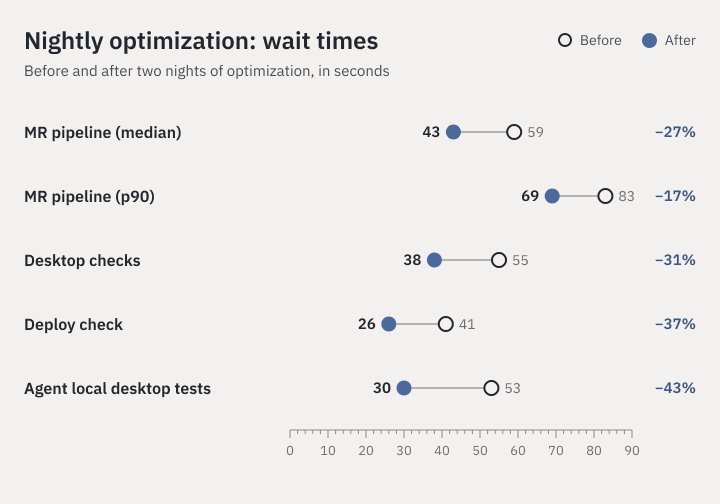
Wait times before and after two nights of optimization.
The buddy in charge of news reads my X bookmarks and the industry and competitor news I follow at 10 p.m. every night, and turns them into a one-page reading brief. It can only write reports and post the reading page and summary. It won’t post, like or repost for me, and it doesn’t follow instructions hidden in outside content.
Automations don’t have to wake a model every time. Cindy can attach a pre-check script that looks for work first. If there is some, it hands the list to an agent, and if not, it just ends, with no session and no notification. Cleaning status labels off closed issues, for example, gets done by the script alone.
The morning reports follow a fixed format, covering what was done, what’s waiting on me, what wasn’t verified, and what’s left to do. Ten minutes of skimming in the morning tells me what happened overnight.
The daily review
Of all this automation, the one I recommend most is the daily review. As I said earlier, many of the rules in AGENTS.md were added after an agent made a mistake. The daily review makes that happen by itself, every day.
At 6 a.m. every day, the buddy in charge of process improvement goes through the previous day’s Claude Code and Codex sessions. Both kinds of session live in Cindy, so it can see all of them at once, and the buddies’ own sessions and private conversations are left out. A script first pulls out what I said, tool errors, commands that kept failing, and time spent, and then an agent goes back to the original records to confirm the causes.
Once, it found a session that had asked me a UI question, and I didn’t answer for 2 hours and 50 minutes. For nearly three hours that session did nothing but wait for me. After the review we added a rule that before asking me something, an agent pushes, merges or moves to the background any work that doesn’t depend on the answer.
Confirmed lessons go to one of three places. Lessons about a particular repo go into its AGENTS.md through a normal MR, habits that apply across projects go into the global ~/.claude/CLAUDE.md, and anything that needs a tool change becomes a GitLab issue. Accepted and rejected suggestions are both kept in a ledger, so the next round doesn’t propose them again. In 17 days the ledger recorded 173 of them.
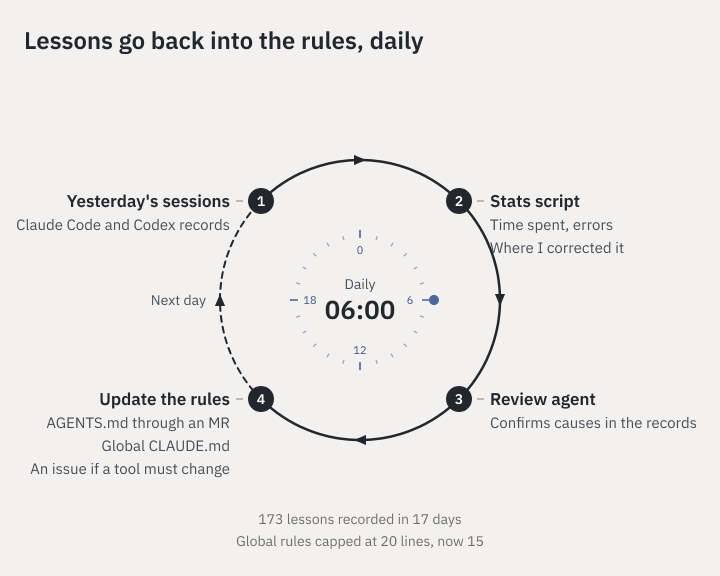
Lessons from the review go into the rules, and the next day’s sessions follow them.
Rules can’t only grow, though. I capped the global agent habits at 20 lines. To add a new one, an old one has to be merged or rewritten first. Otherwise every problem would add another line to every session, and before long the rules themselves would become the burden.
Why Cindy
Almost everything above, including the features marked in blue in the opening picture, I do in Cindy. It’s an open-source AI agent that works out of the box. It runs both Claude Code and Codex, and I pick the engine and model per task. For this post, for example, Claude dug through the data, drew the figures and wrote the first draft, and Codex did the rewrites from review comments. The two share one memory, so I don’t have to explain the background again. More importantly, all the sessions are in one place, which is what lets the daily review read through every conversation I had with agents and find what to improve.
It’s feature-complete and works out of the box. Voice input can use all kinds of models, including ones you host yourself, it connects to the major model providers, and the extras you end up needing, like remote desktop and computer use for driving the computer and the browser, are already there. When I’m away from my computer, I can keep working on the Mac at home from my phone. Cindy also connects to Telegram, which is where the group collaboration above comes from.
It’s also very flexible. Every session gets its own worktree, and agents can message each other, start subagents, open side chats and new sessions, and work across machines. There’s very little it can’t do. Cross-machine testing is a good example. Cindy has Orca built in, and I don’t even have to ask for it. The main session sends a worker to Windows or another Mac to run the tests, and the results come back on their own. On one big feature, a team had 6 testers accepting the work on both platforms at the same time.
The buddies described earlier are built into Cindy too. The working directory, memory and playbook belong to the role, an automation wakes it up on schedule, and with a pre-check script the model doesn’t even have to wake up when there’s nothing to do.
The browser, ssh, GitLab/GitHub, calendar, web search and more all connect through plugins. From research and writing code to verifying on another machine and checking a release, nearly all of it happens inside Cindy. Other agent tools can do these things too, but usually only after fairly involved setup, and you have to test for yourself how well each piece fits together. Cindy works out of the box, and I recommend it because I use these features every day.
Wrapping up
Going back to the opening picture, I take up only the small circle in the middle, and the ring around it keeps turning on its own. After a month of this, the four things from the beginning are still what helped most.
Be clear about which decisions have to stay with you. I set the direction and make the trade-offs, and anything an agent can finish on its own goes out whole. After that, manage by results. Deliveries come with verification and a clean finish, and anything that couldn’t be done is written down. When I do have to step in, it should be for one clear decision or one approval.
Repetitive management should become process. Rules and checks can’t depend on me reminding anyone, and chores need a fixed place to go. Mistakes should feed back into the system, so that a correction made once benefits all the work after it, and the review and rule cleanup itself is worth handing to an agent every day.
None of this requires Cindy. Paseo can do similar things, and you could piece it together yourself from the official CLIs plus worktrees, launchd and a Telegram bot. The rules, tools and playbooks all travel with you. What Cindy gives me is everything in one place, out of the box, so I don’t have to watch several unrelated windows at once.
It has its annoyances. The UI changes every so often. An update lands and the interaction is different, and I can’t always tell whether it’s better or worse. I don’t think a productivity tool should change that abruptly. I also can’t quite see how much context it feeds Claude, and sometimes I worry it’s too much. The mobile app is so-so, and so is its performance. Still, all of that adds up to less than the time it saves me.